# KHỞI TẠO SỰ KIỆN (GENERAL)
**Bước 1**: Vào menu chọn **News & Event** => chọn **Events** => chọn **Add**
[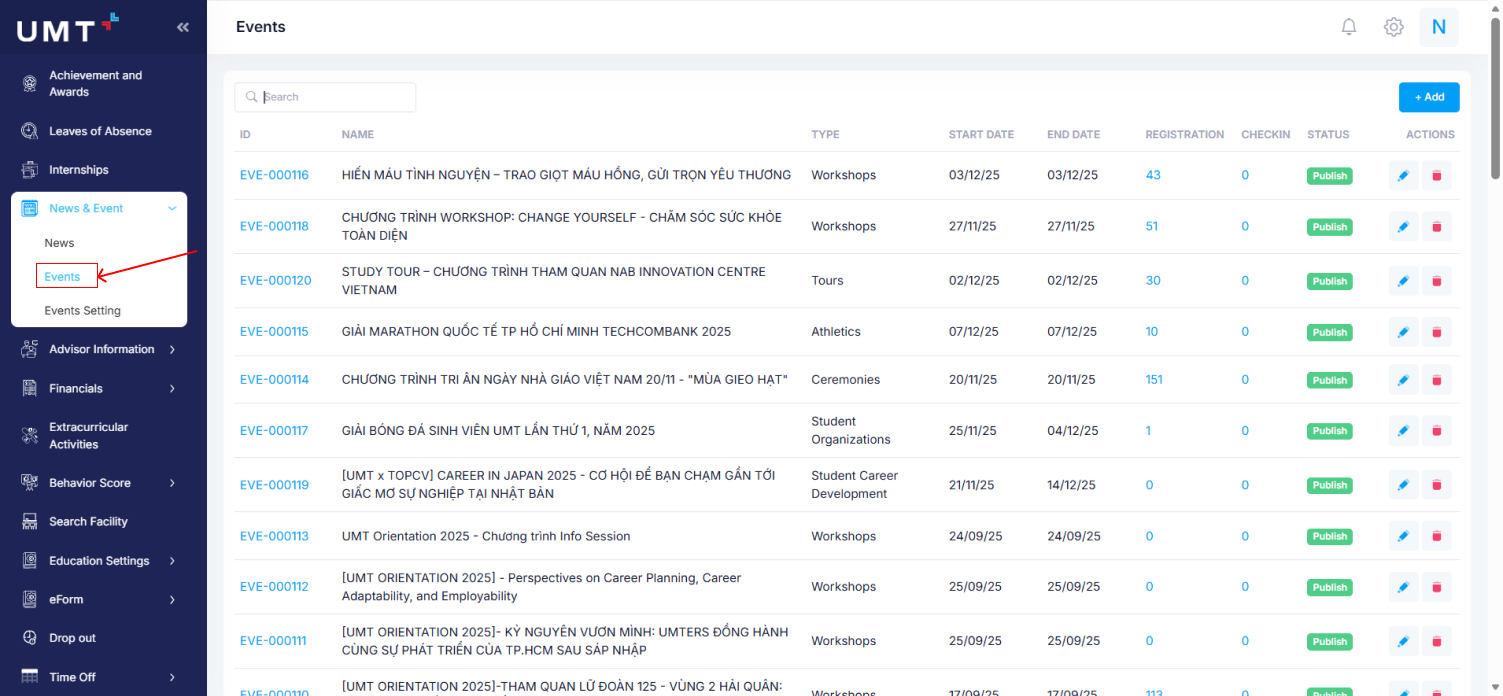](https://kb.umt.edu.vn/uploads/images/gallery/2025-12/DRqZRiohJ7G8QtJM-image.png)
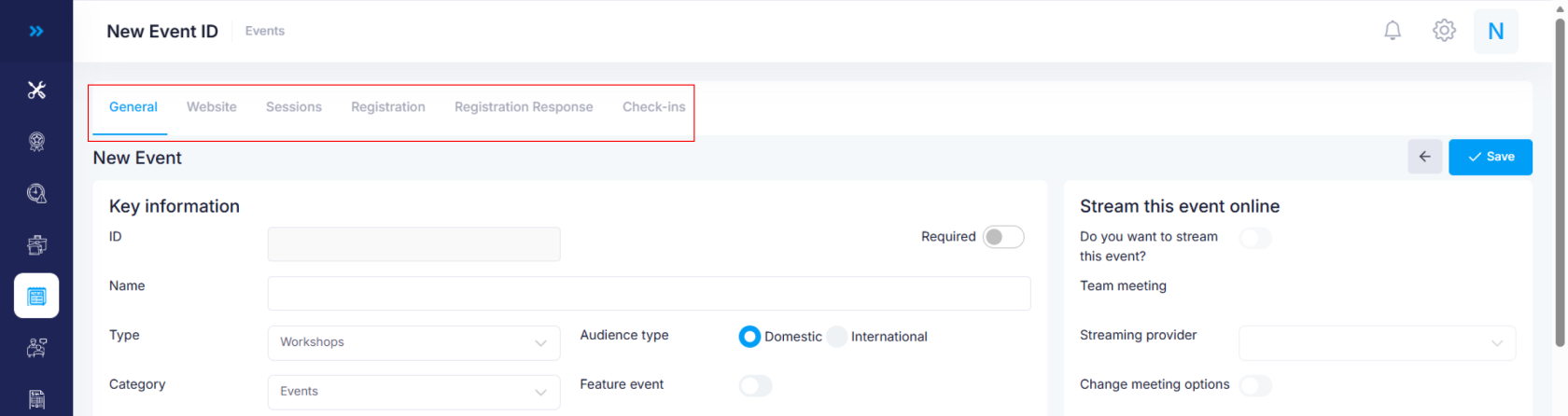
**Bước 2**: Chú ý các tab thông tin
**General**: Thông tin cơ bản của sự kiện
**Website**: Đường link sự kiện, hình ảnh đại diện và nội dung mô tả sự kiện
**Sessions**: Các phiên làm việc trong một sự kiện
**Registration**: Danh sách người đăng ký tham gia sự kiện
**Registration Response**: Danh sách các kết quả khảo sát (nếu có) từ người đăng ký sự kiện trong trường hợp sự kiện có dùng các custom field để thu thập thêm thông tin người dùng
**Check-ins:** Danh sách người đến dự sự kiện
[](https://kb.umt.edu.vn/uploads/images/gallery/2025-12/NUKAQkh8fImmcfaw-image.png)
**Bước 3.1**: Tab **General**:
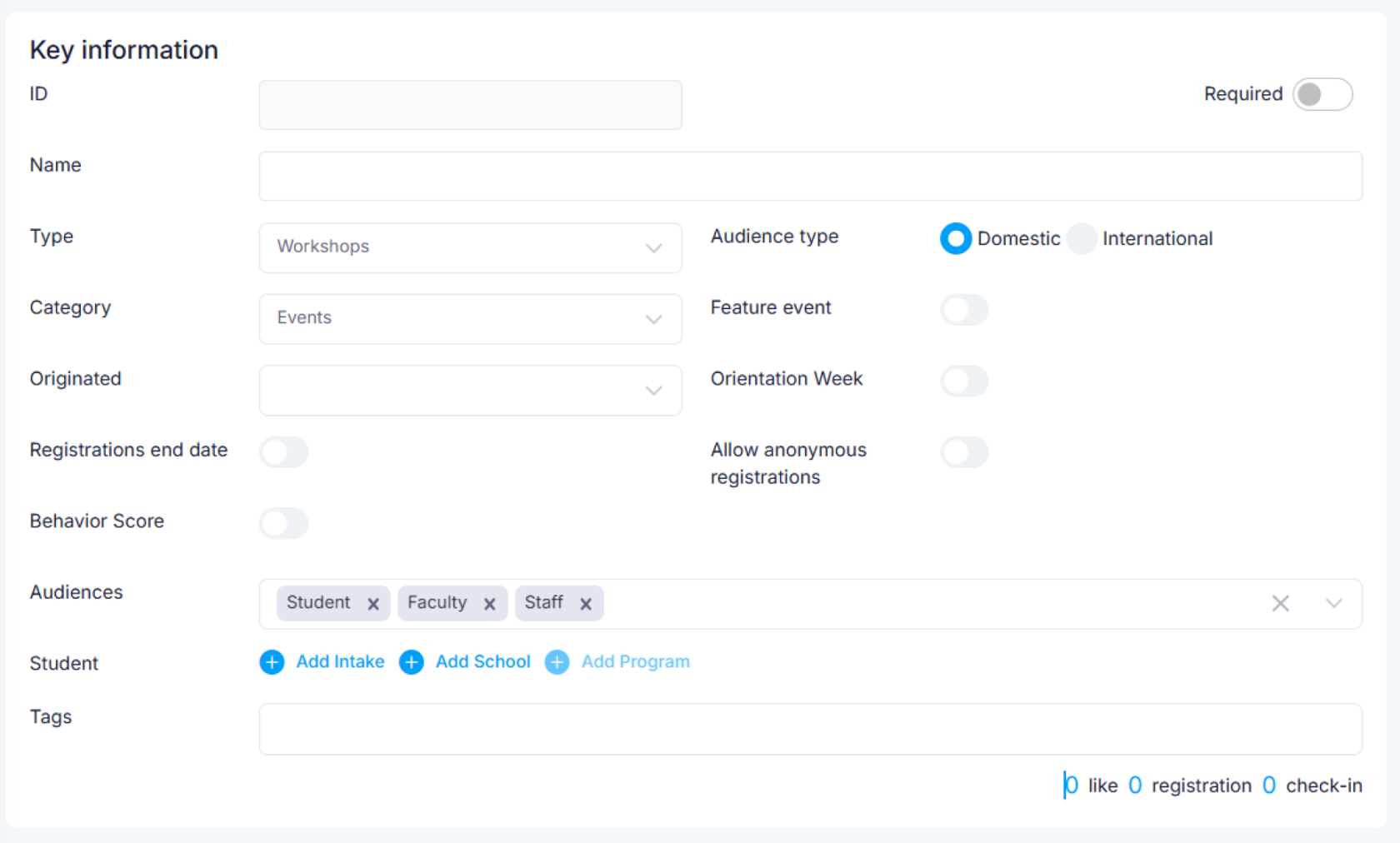
- Phần **Key Information**:
**Name**: Tên sự kiện
**Type**: Loại sự kiện
**Category**: Phân loại sự kiện
**Originated**: Đơn vị tổ chức
**Audiencetype:** Sự kiện trong nước hay có tính quốc tế
**Audiences**: đối tượng được đăng ký tham dự sự kiện
**Feature event**: Đây có phải là sự kiện nổi bật ở UMT
**Enable multi-attendee**: Có cho phép người đi cùng với người đăng ký sự kiện không?
**Allow anonymouse registrations:** Có cho phép đăng ký tham gia mà không cần đăng ký trên website
**Registration end date**: Ngày kết thúc đăng ký
**Closed Message:** Thông báo khi sự kiện đã qua ngày đăng ký
**Behavior Score**: Sự kiện này có tính điểm rèn luyện không?
**Tags**: thẻ phân loại
[](https://kb.umt.edu.vn/uploads/images/gallery/2025-12/sOLI1Ykx01VGB7to-image.png)
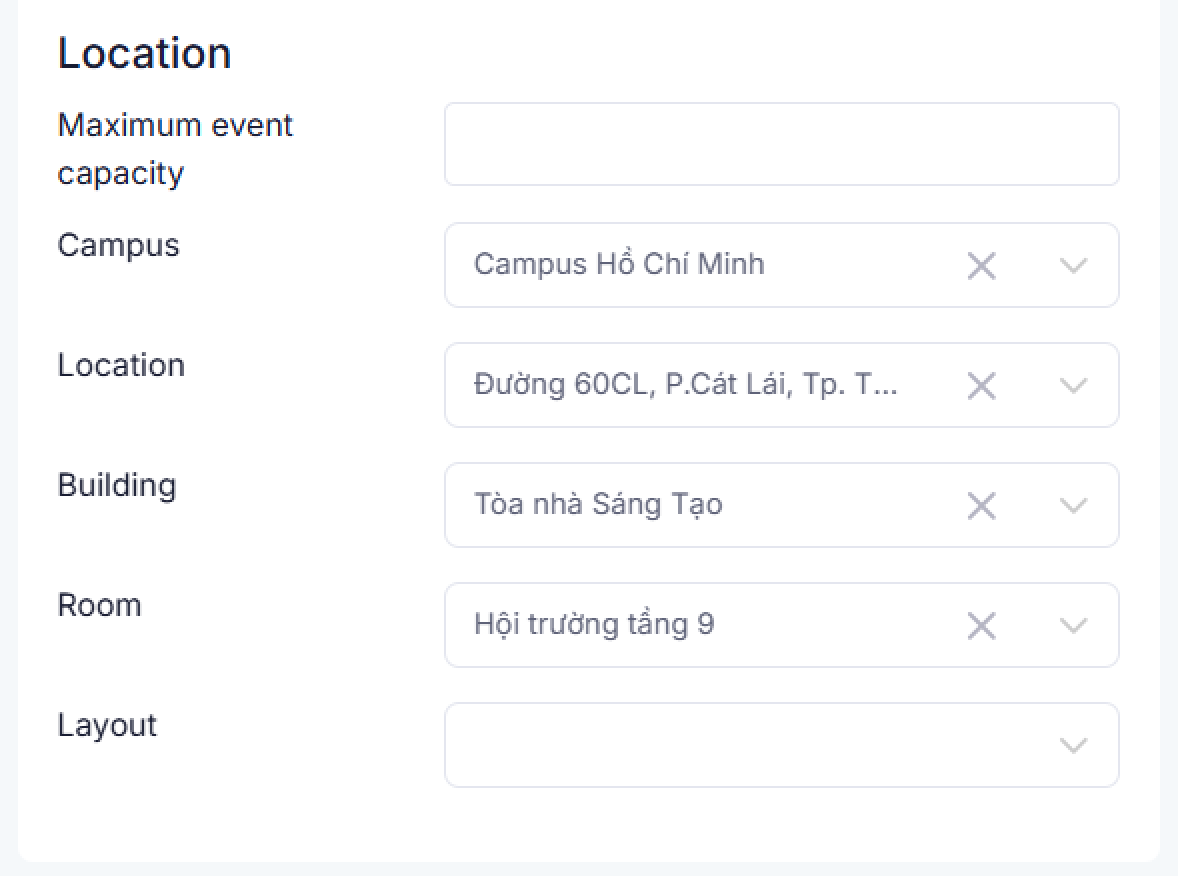
- Phần **Location**:
**Maximum event capacity**: Sức chứa tối đa của sự kiện. Dùng để giới hạn người đăng ký sự kiện
**Campus**: Campus nơi tổ chức sự kiện
**Location**: Địa điểm
**Building**: Tòa nhà
**Room**: Phòng tổ chức
**Layout**: Khu vực tổ chức
**Other address:** Địa điểm khác (Trường hợp chỉ muốn nhập một địa chỉ duy nhất. Áp dụng với các sự kiện đi bên ngoài như tham quan một địa điểm, công ty,…)
[](https://kb.umt.edu.vn/uploads/images/gallery/2025-12/LReH2MawJj9HAeJf-image.png)
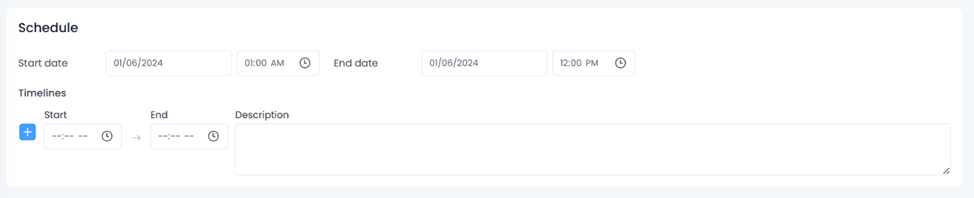
- Phần **Schedule**:
**Start date:** Ngày giờ bắt đầu
**End date: **Ngày giờ kết thúc
**Timelines: **Thêm nhiều lịch trình theo các mốc thời gian ấn định trước
Start: Thời gian bắt đầu
End: Thời gian kết thúc
Description: Nội dung
[](https://kb.umt.edu.vn/uploads/images/gallery/2025-12/GUteAwf2STt0Nth7-image.png)
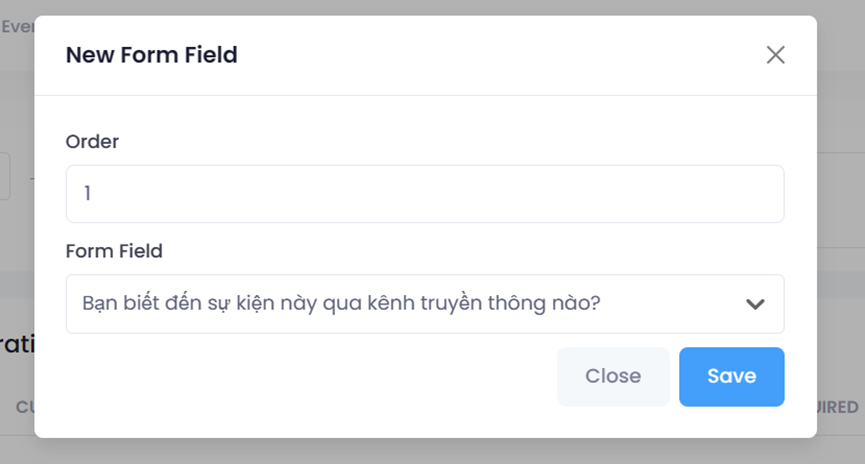
- Phần **Custom Registration Field**:
Nhấn **Add new**
**Order: **Vị trí câu khác sát trên form đăng ký
**Form Field**: Lựa chọn câu khảo sát ở ngân hàng câu khảo sát (Custom Fields)
[](https://kb.umt.edu.vn/uploads/images/gallery/2025-12/M0IuYc1HEo33S6UC-image.png)
[](https://kb.umt.edu.vn/uploads/images/gallery/2025-12/SP7eUz7dx6XIBn8Q-image.png)
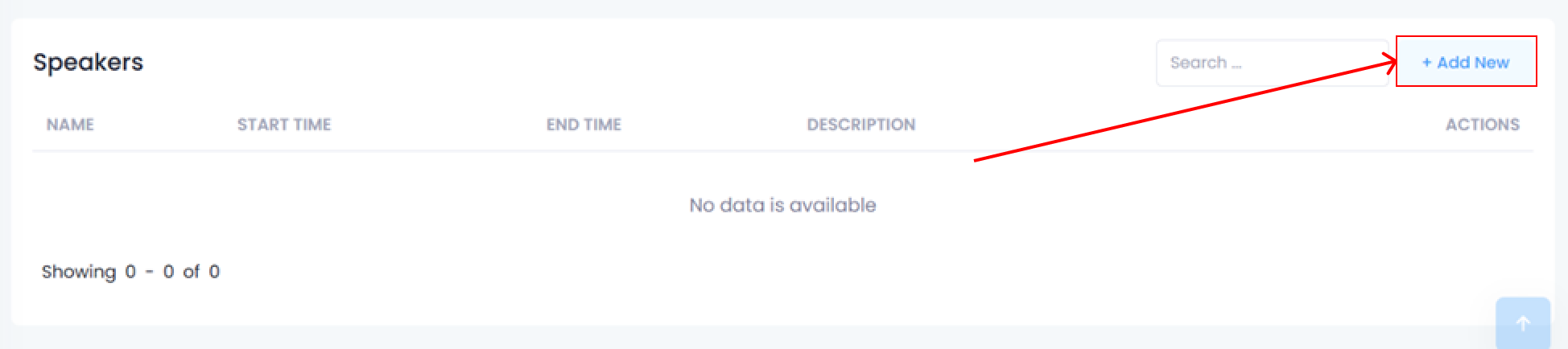
- Phần **Speaker**:
Nhấn **Add new** để thêm diễn giả
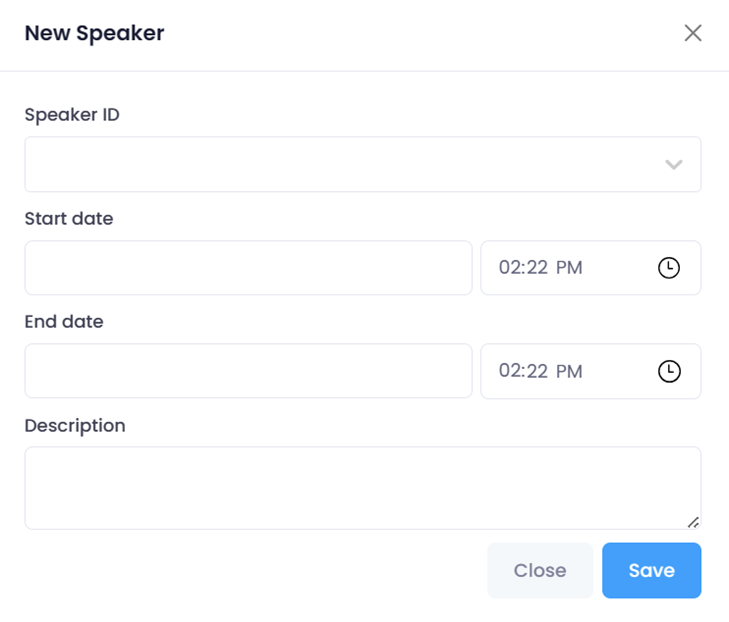
**Speaker ID**: Lựa chọn diễn giả trong danh sách diễn giả có trên hệ thống. Nếu chưa có thì tạo mới ở mục [**Event Settings**](#_Di%E1%BB%85n_gi%E1%BA%A3)
**Start Date**: Ngày giờ bắt đầu diễn thuyết của diễn giả tại sự kiện.
**End Date:** Ngày giờ kết thúc diễn thuyết của diễn giả tại sự kiện.
**Description:** Mô tả khác
Nhấn **Save** để thêm diễn giả vào sự kiện. Một sự kiện có thể thêm nhiều diễn giả, các diễn giả được thêm ở mục General là cơ sở để phân bổ vào các Sessions (phiên làm việc) ở Tab Sessions
[](https://kb.umt.edu.vn/uploads/images/gallery/2025-12/72HxchgtLEKsqDVU-image.png)
[](https://kb.umt.edu.vn/uploads/images/gallery/2025-12/RZRU7dUStC6qb09A-image.png)
Sự kiện sau khi **Save** sẽ ở trạng thái draft, nhấn nút **Publish** để hiển thị sự kiện ở trang. Nhấn **Unpublish** khi muốn tắt hiển thị sự kiện.